


Currently viewing: Welcome

Childcare management platform

Everything your childcare center needs. One connected platform.

Run your center, support your educators, connect with parents, manage payments and follow every child's journey, all from one place.

Play the intro0:45
  • A portal for your team
  • An app for families
  • Built for early years
peek.peek-a-boo.app
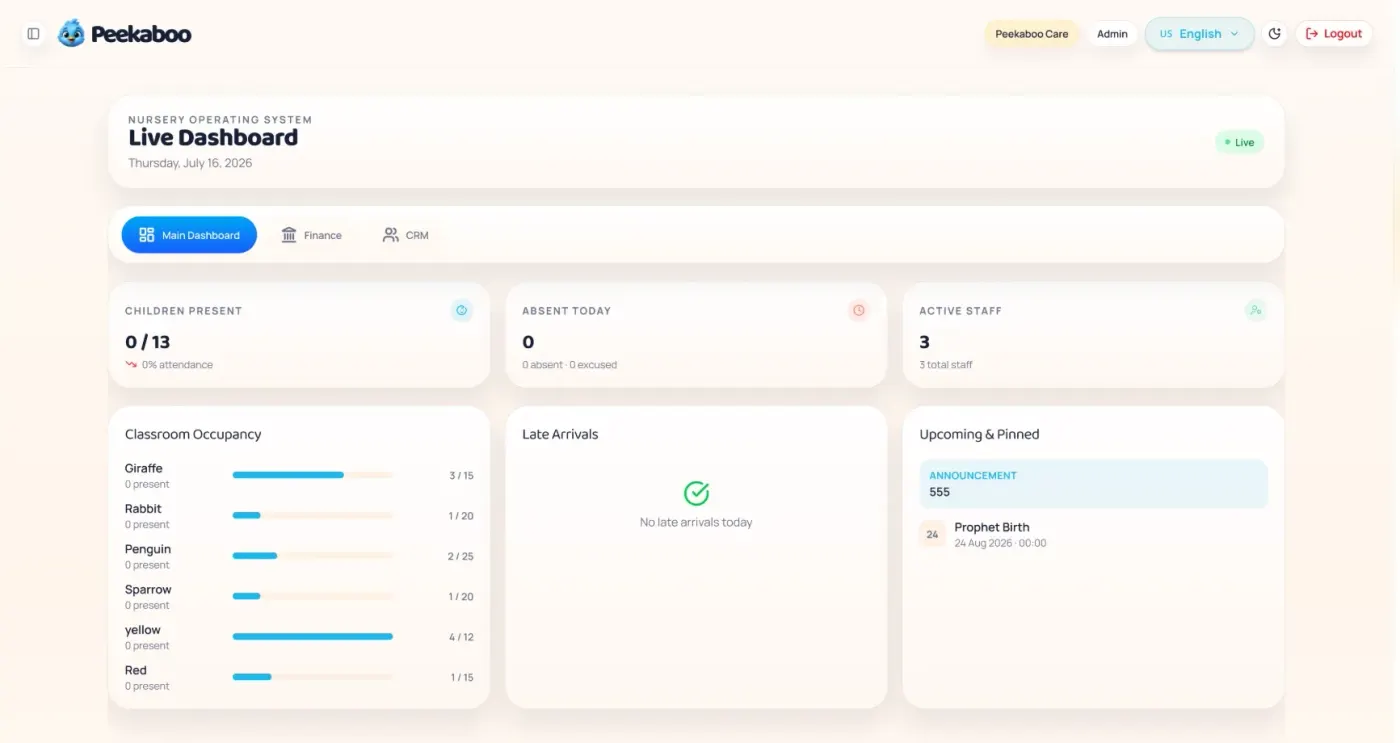
The Peekaboo Care live dashboard, showing children present, absences today, active staff and classroom occupancy per room.
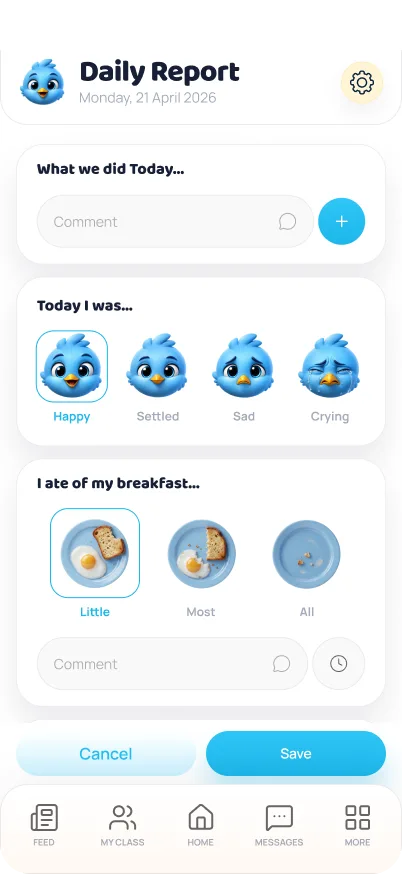
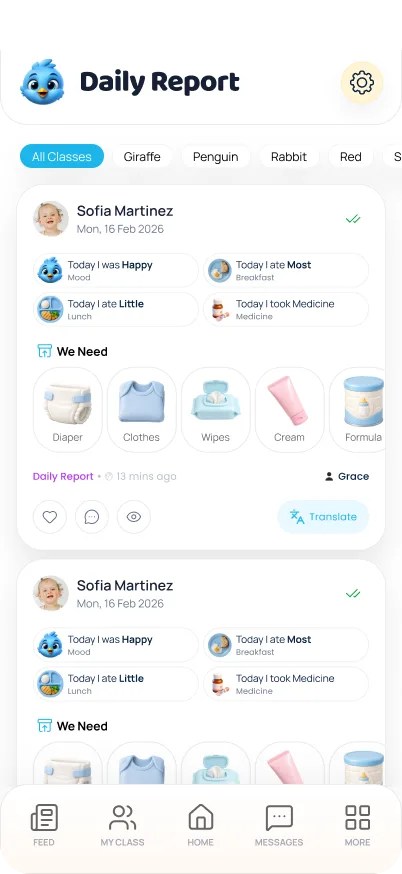
A daily report in Peekaboo Parent, showing a child's mood, meals, medicine and the supplies they need.

Watch the intro

Meet Peekaboo. In 45 seconds.

From five scattered tools to one connected platform. Pick a chapter to jump straight to the part that matters to you.

Plans

Three ways to start with Peekaboo

Every center is different. Pick the one that matches yours, or talk it through with us first.

Most popular

Use Peekaboo

Start with the full Peekaboo platform and the modules your setting needs. There is nothing to build and nothing to specify, so you run on proven software from day one.

Best for

Settings that want to be up and running quickly

  • Peekaboo Care for your team
  • Peekaboo Parent for families
  • The modules that fit how you operate
Talk to us about this

Customise your own app

Keep the Peekaboo Care platform running your operation, and give families a parent app carrying your own name, logo and identity instead of ours.

Best for

Groups with an established brand families already know

  • Parent app in your branding
  • Your logo, colours and identity
  • Powered by Peekaboo Care
Talk to us about this

Build your own system

For organisations whose processes don't fit an off-the-shelf platform: a management system and parent app designed around your operation, built on Peekaboo's foundations.

Best for

Larger groups with specific operational requirements

  • Custom management system
  • Custom parent application
  • Modules designed to your process
Talk to us about this

However you start with Peekaboo, families stay connected to their child's day.

Our App

Families follow the day as it happens

Peekaboo Parent is the mobile half of the platform. Everything in it comes from records your team already keeps, so nothing gets written twice.

Step 1 of 4

Daily updates

Photos and moments from the room reach families as they're posted, instead of at the door three hours later.

A daily report in Peekaboo Parent, showing a child's mood, meals, medicine and the supplies they need.

Step 2 of 4

Communication

Announcements, newsletters and event invitations land in one place, sent to the right classes.

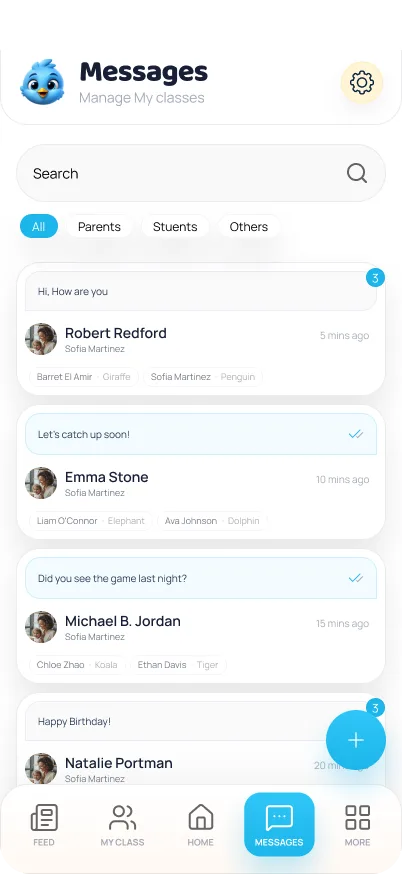
The Peekaboo Parent inbox, showing conversations with families and colleagues.

Step 3 of 4

Development

Observations, milestones and learning journals show parents how their child is progressing.

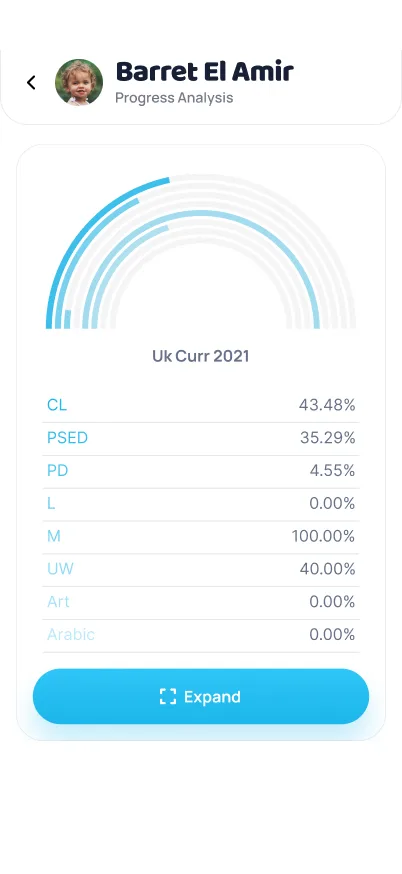
A child's progress analysis, showing curriculum coverage across each learning area.

Step 4 of 4

Payments

Invoices and receipts sit alongside everything else, so fees don't need a separate email thread.

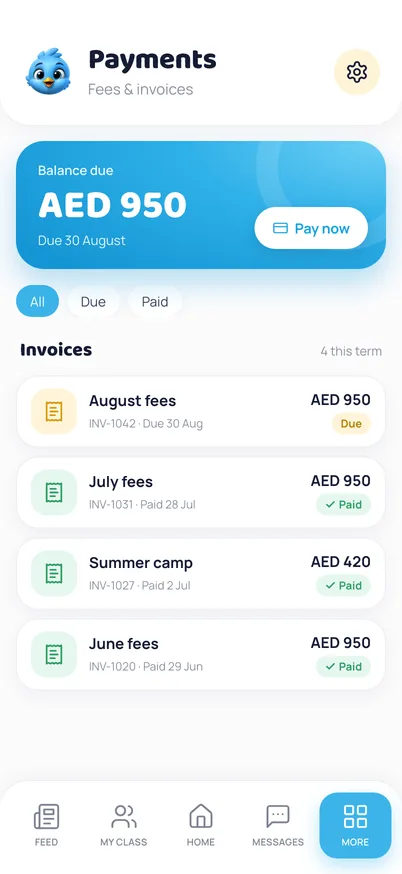
Payments in Peekaboo Parent, showing the balance due and each invoice marked due or paid.

Built for mixed communities

Peekaboo runs in English and Arabic, and flips the entire interface to right-to-left on its own, for staff and families alike.

  • English
  • العربية

Parents see that side. Your team works with this one.

Features

What's inside Peekaboo

Three parts carry the product: the portal your team runs on, the app families follow, and the pipeline that fills your places. Everything else supports them.

Center operations

See your whole setting at a glance

Attendance, occupancy and staff cover update through the day, so you're not chasing four people to find out where the setting stands.

  • Classroom management
  • Multi-center management
  • Attendance & check-in
  • Child profiles
  • Classroom ratios
  • Calendar & events
peek.peek-a-boo.app
The Peekaboo Care live dashboard, showing children present, absences today, active staff and classroom occupancy per room.
The live dashboard in Peekaboo Care

Parents & children

Families see the day, as it happens

Daily reports, photos and messages reach parents straight from the room, built from the records your team already keeps rather than written a second time.

  • Daily reports
  • Photos & moments
  • Announcements
  • Observations
  • Learning journals
  • Photo permissions
An educator filling in a daily report in the app, choosing a child's mood and how much of breakfast they ate.
The daily report in Peekaboo Parent

Admissions CRM

Turn enquiries into enrolments

You follow every family that gets in touch from first contact through tour, waiting list and approval, so nobody goes quiet because a callback slipped.

  • Lead pipeline
  • Tours & visit notes
  • Waiting list
  • Lead sources & referrals
  • Enrolment checklist
  • Enquiry records
peek.peek-a-boo.app
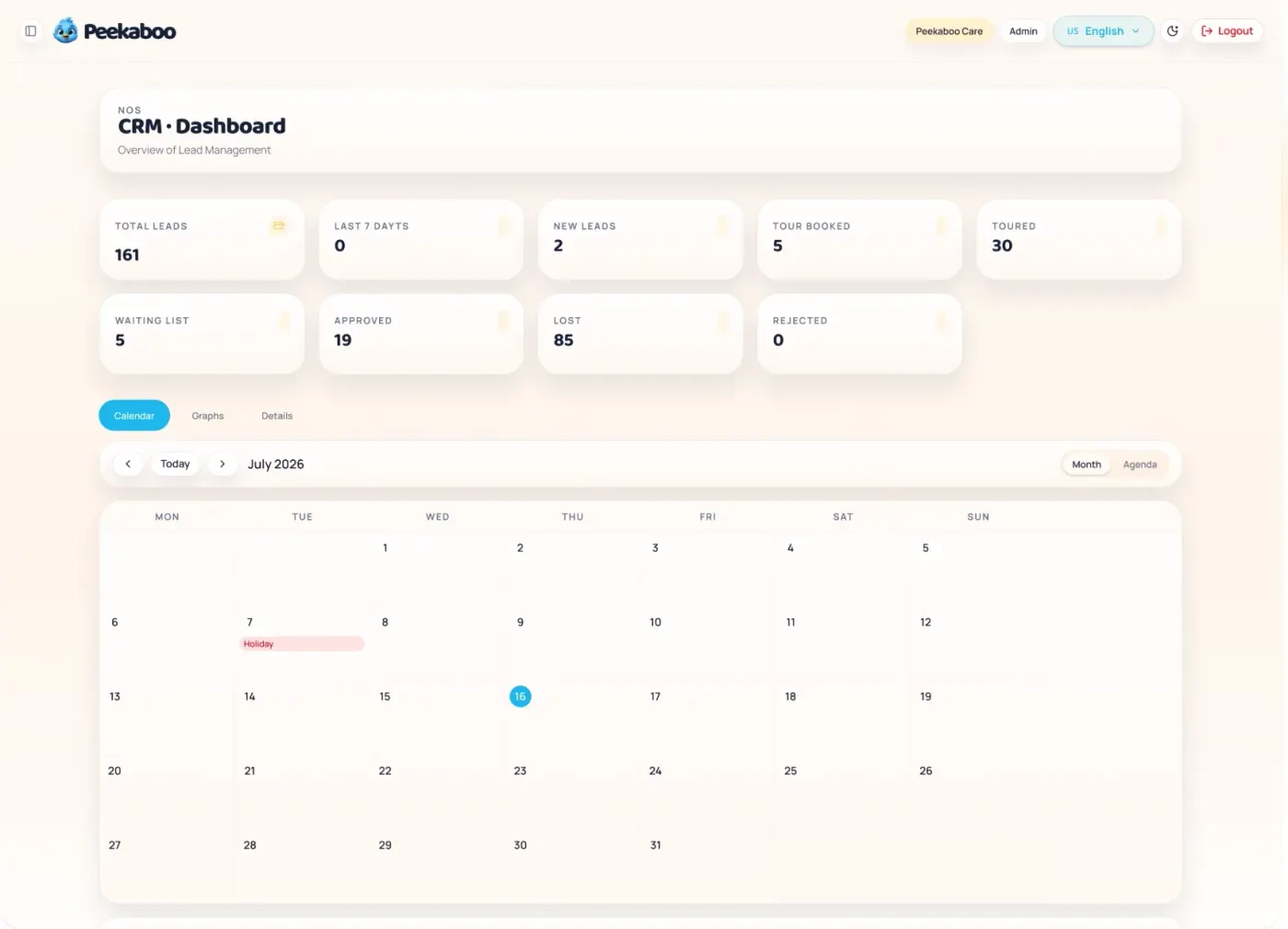
The Peekaboo Care CRM dashboard, showing total leads, tours booked, waiting list and admissions outcomes above a month calendar of booked tours.
The admissions pipeline in Peekaboo Care

And everything around them

Staff

Records, cover and permissions in one place.

  • Employee profiles
  • Staff attendance
  • Class assignment
  • Roles & access

Finance

Fees in, costs out, and a clear monthly picture.

  • Billing & invoicing
  • Payments & receipts
  • Expenses
  • Suppliers & purchases

Insights & security

Know where you stand, and keep records safe.

  • Classroom insights
  • Health & incidents
  • Encrypted storage
  • Scheduled backups

It adds up to a different kind of working week.

Improve

What actually changes

Most settings have plenty of systems. What they want is one system. This is what usually shifts in the first month.

  • PaperworkDigital records
  • SpreadsheetsOne central dashboard
  • Manual invoicingDigital billing
  • Disconnected appsOne connected platform
  • Difficult reportingReal-time insights
  • Repetitive adminFewer things done twice

One platform

Everything above, in a single system

About

Built around the way early-years teams actually work

Peekaboo brings administration, educators, families, children's development, payments and communication together in one connected environment, and it stays configurable, because no two settings run the same way.

Used by settings like

  • Nurseries
  • Preschools
  • Daycare centers
  • Kindergartens
  • Montessori settings
  • Nursery groups

Whether you run a single room or a group of centers, the same platform adapts. Classes, age groups, curriculum frameworks and fee structures are all yours to define.

Peekaboo is built and supported by Educore Systems & Technologies, based in Dubai.

Why Us

Why one platform beats five tools

The case for Peekaboo is what stops being your problem.

Everything connected

Children, parents, educators, billing and operations in one system instead of five.

Less administration

Records entered once travel to the parent, the report and the invoice on their own.

Better parent engagement

Families see the day as it happens, so pickup stops being the only update they get.

Understand child development

Observations, milestones and journals build a record that follows each child.

Fill your places

Enquiries tracked from first contact to first day, with a view of which sources actually bring families in.

Flexible for your organisation

Use Peekaboo as it comes, brand the parent app, or have it built around your process.

Curriculum

Your curriculum. Your framework. Built into Peekaboo.

Peekaboo doesn't impose a curriculum on your setting. You define the learning areas, objectives and attainment levels you work to, and everything else follows that structure.

  1. Define

    Set up your framework

    Create learning areas and the aspects within them, then define the attainment levels your setting uses.

  2. Plan

    Map objectives

    Attach learning objectives to age groups and attainment levels so expectations are clear per stage.

  3. Observe

    Record what you see

    Educators log observations against objectives, with next steps captured while it's still fresh.

  4. Report

    Turn it into evidence

    Generate assessment reports by child, class, learning area or date range when you need them.

Set up by settings working to

  • EYFS, Early Years Foundation Stage
  • WSD, Whole School Development
  • Reggio, Reggio Emilia

Because you define the framework, Peekaboo can be configured for any of these, or for a structure that's entirely your own.

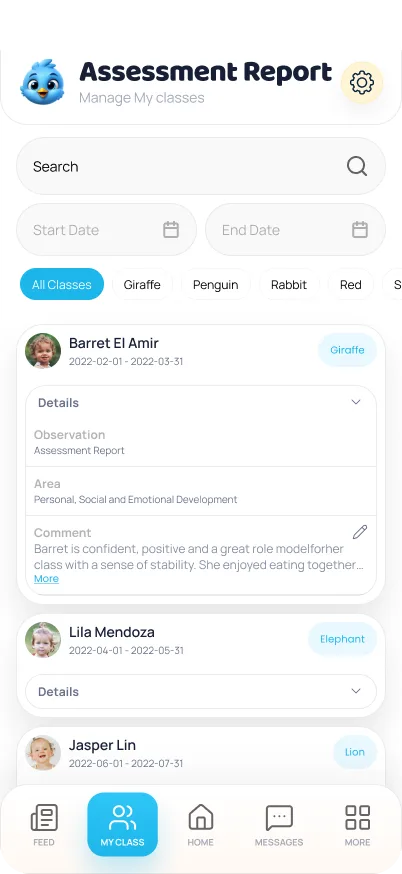
The assessment report screen, listing each child's observations by learning area, filtered by class and date.

A theme leads to activities, activities map to objectives, and an observation becomes part of the child's journal.

Questions

What centers ask us before they start

If your question isn't here, the form below is the fastest way to get a straight answer.

Can Peekaboo replace the separate tools we use today?

That's the intent. Attendance, daily reports, curriculum and observations, staff records, invoicing and expenses, and your admissions pipeline all live in one platform, so you can retire the spreadsheets, group chats and paper folders rather than duplicate them.

Do parents need to download an app?

Yes. Families use the Peekaboo Parent app to see daily reports, moments, announcements and events as they're published. It's available in English and Arabic, with full right-to-left layout.

Which curriculum frameworks does it support?

The curriculum module is framework-agnostic. You define your own learning areas, aspects, objectives and attainment levels, which means it can be set up for EYFS, Whole School Development, Reggio Emilia or a framework specific to your setting.

Can we run more than one center?

Yes. Each center has its own details, licence dates, currency and timezone, and management can work across all of them from a single account.

Can we use our own branding?

Yes. Alongside using Peekaboo as it comes, you can have the parent app published in your own branding, or have a system and app built around your specific operation. Those are the three ways settings adopt Peekaboo.

How is our data protected?

Records are held on secure infrastructure with encrypted storage and scheduled backups, and access is controlled by role, so staff only reach the information their role requires.

Run your childcare center with less admin and more connection.

Contact

Ready to see Peekaboo in action?

Tell us about your center and we'll help you find the right Peekaboo setup.

We'll only use these details to reply to you. See ourprivacy policy.